
 Unlike with console gaming, where developers optimize their games for one specific hardware configuration, PCs vary heavily when it comes to hardware. No matter what your components are, there are ways to squeeze out some extra frames-per-second.
If you have the latest game and it’s still unplayable even after all the tricks outlined in this article, you’re probably due for an upgrade. Your graphics card is usually the first thing to replace. Check Logical Increments to see what graphics cards are recommended and how well each one performs. You might also consider upgrading your CPU and RAM, because those have big impacts on overall performance.
Now, here are five things you can do to improve your FPS without spending any money:
1. Reduce your resolution
The resolution that you play at has the biggest effect on gaming performance. Check the following chart to see how much FPS drops when you play games like Bioshock Infinite and Crysis 3 at higher and higher resolutions:
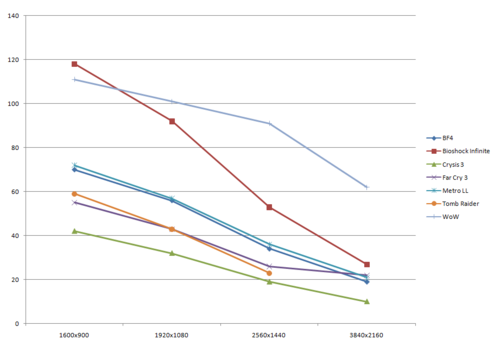
The drop in performance is roughly linear, and it is proportional to the number of pixels your hardware is driving. Thus, if you are not getting an adequate framerate at 2560×1440, then drop to 1920×1080. The number of pixels is reduced by about 44%, but the performance will improve by about 40%. Going from 1920×1080 to 1600×900 is a 30% drop in pixel count, but will give you about a 20% boost in framerate. Lowering the resolution will make your game look more pixelated, but that might be a necessary sacrifice in order to run the game at an acceptable framerate.
Techpowerup source for FPS at various resolutions
Anandtech source for FPS of weak iGPUs at very low resolutions
2. Update your graphics card drivers
This is a pretty simple one, and some people will already have this base covered. But whether you have a low-tier graphics card like an RX 560, a high-tier graphics card like an RTX 3080, or even an integrated graphics processor, running old drivers—the basic software your GPU uses—can be a very large detriment to your FPS, though many people fail to update their drivers to the latest versions.
To update your drivers, you must first figure out which video card you have. On Windows, open the Device Manager and check your display adapter. For OS X, click on the apple on the top left corner, then click “About This Mac,” and then “More Info.” Next to “Graphics” you can find what video card you have. For GNU/Linux, either download CPU-G or use your distro’s repositories to get it, and then go to the tab at the top labeled “Graphic” and next to OpenGL renderer is your video card.
Once you know your GPU, download the latest drivers from the company’s website, whether it is Intel, NVIDIA, or AMD. Don’t use the card manufacturers site, such as ASUS, MSI, Gigabyte, or Sapphire. Simply find the driver you need, select the appropriate operating system, download the driver and follow the instructions given.
Thankfully, most modern graphics cards will automatically prompt you to update your drivers if you have automatic updates turned on. But just in case, here are links to the latest graphics drivers from each GPU manufacturer:
3. Change the game’s video settings
Just about everything in the game settings, such as shadow quality and draw distance, can affect your FPS. If you’re not getting the performance you’d like, try lowering some of the video settings. Some settings will have a greater impact on performance than others, so try to find a good guide or article that has benchmarked the various settings. (We have such guides for games such as World of Warcraft, Grand Theft Auto V, Minecraft, and Cyberpunk 2077.)
Also, NVIDIA’s GeForce Experience and AMD’s Gaming Evolved clients will automatically optimize your game’s video settings based on your hardware.
Adjusting anti-aliasing can be particularly helpful for improving sub-par performance. Anti-aliasing smooths out lines around borders of objects to make them less pixelated, which can take a lot of hardware power.
In your games settings, first try disabling anti-aliasing altogether and then slowly turning it up to the point that it works while still leaving you satisfied with your FPS.
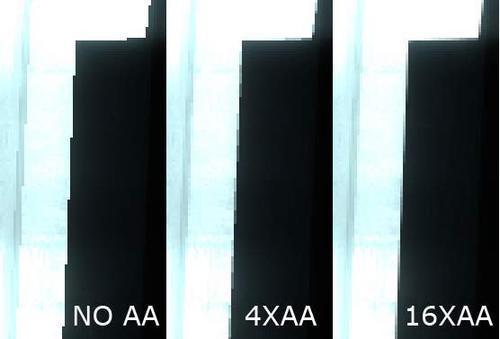
(Anti-aliasing example. Image courtesy of hothardware)
Tomshardware: Anti-aliasing analysis, part 1
Tomshardware: Anti-aliasing analysis, part 2
4. Overclock your hardware
This isn’t something we recommend everyone do, unless you know what you’re doing and you understand that you can risk breaking your video card, CPU, RAM, or really, your entire computer.
The first thing you should overclock is your video card. Most video card drivers have an ability to overclock your video card, so that is a recommended method, though you might need to find third-party software if your drivers don’t include an overclock option.
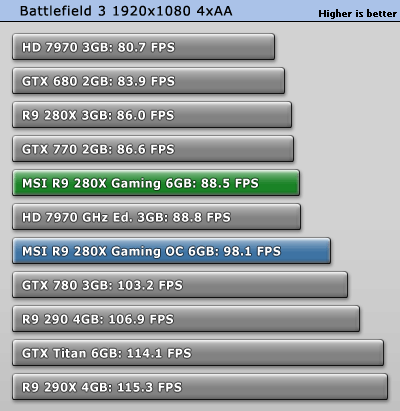
(The R9 280X gains an extra 10 FPS due to OC. Image courtesy of Techpowerup)
You can also overclock the CPU and RAM. That’s much easier if you can simply find overclocking settings in your PC’s BIOS. However, overclocking the graphics card will provide the greatest FPS boost.
5. Use PC optimization software
Many programs run in the background of your PC and can use up memory and CPU power. There are many PC optimization utilities to clear out these unneeded processes that could ruin game performance.
Windows includes some built-in optimization tools, but there are many others like the Razer Game Booster that can do a lot of the hard work for you.
You can also look into this ‘Autoruns’ utility for identifying and manually managing processes that run automatically on a Windows PC, including many services and elements that are not listed in the ‘Startup’ tab of Task Manager.
78 Comments
You can post comments in this post.
wat
u suck 11 years ago
Can I help you understand it better?
Matthew Zehner 11 years ago
this is the basic shit every gamer know it
arish 11 years ago
We’re glad that you know the information! However, hopefully these tips will help those who don’t.
Matthew Zehner 11 years ago
Thanks for the tips! They were great help for me 🙂 dont mind the other troll comments! Most people dont even comment on these forums, so on behalf of all of us you helped: thank you!
kiki 11 years ago
Thanks! We’re so glad you liked it!
Matthew Zehner 11 years ago
Sorry but i didn’t understand anything from those tips do you recommend me going to another website because my pc is not made for gaming and i hate this ;-;
Josh 11 years ago
We would definitely be able to give customized help if you wanted! What are the specs of your PC and what games do you want to play?
Matthew Zehner 11 years ago
i play rocket league what could i do if my settings are all minimum????
ben ross 10 years ago
What are the hardware specs of your system?
Matthew Zehner 10 years ago
i play rocket league what could i do if my settings are all minimum????
ben ross 10 years ago
Rip i dont understand this
Casey 11 years ago
Sorry about that! Can I be of any personal assistance to you?
Matthew Zehner 11 years ago
Pretty good info. I would like someone show required gpu cpu ram motherboard ssd to get 144 fps in a game with all settings on ultra. Like this is what you need at 720, 1080, 2k, 4k , etc.
Lily Anderson 11 years ago
Thanks for the feedback!
Matthew Zehner 11 years ago
I play csgo, and atm i have a laptop, i have updated my graphics driver, and csgo currently runs at around 30 fps, do u know how to get that fps up to more like 50 ??
bobby 11 years ago
Did it always run at around 30? If this isn’t a recent development, it is possible that your computer isn’t powerful enough to run it at above 50. If this is the case, try turning down some of the settings.
Matthew Zehner 11 years ago
i cant actually remember if it always did but im pretty sure my laptop has slowed down, It used to run fine. Thanks
Bobby 11 years ago
Are you running any programs in the background that could be diverting resources? Has this happened in other games? What are your system’s specs?
Matthew Zehner 11 years ago
i cant actually remember if it always did but im pretty sure my laptop has slowed down, It used to run fine. Thanks
Bobby 11 years ago
I play csgo, and atm i have a laptop, i have updated my graphics driver, and csgo currently runs at around 30 fps, do u know how to get that fps up to more like 50 ??
bobby 11 years ago
hi ive got a pc thats got a great gpu but my prosessor isnt the best for games such as rus and dayz. any way off boosting fps in rust dayz stranded deep(open world games)
sP TuXN 11 years ago
You could turn down settings within the game – that tends to be the best way of increasing FPS. What are your system’s specs?
Matthew Zehner 11 years ago
i love the idea. it’s inspiring. and soon i’ll try it. tq for sharing your knowledge.
krissindo 11 years ago
We’re glad you like the article!
Matthew Zehner 11 years ago
Go to task manager, then select the game/process you are currently running. Then click on details, the click on the game/process again for options. Then click on priority and select “high” this will use almost all cpu for the game you are currently running
Gertjan Mens 11 years ago
Thanks for the tip!
Matthew Zehner 11 years ago
I play dota 2 in my Acer aspire e1-431. but the maximum fps is only 30. help me. i know my laptop is not for gaming but i wish my fps goes 45 or higher. Thank you 🙂
Vince 11 years ago
What settings are you currently playing the game on? You could try lowering some of the settings.
Matthew Zehner 11 years ago
i tried Gertjan Mens tip, it worked a little bit it increased to 45fps but drops down sometimes and im playing the lowest settings in dota 2. The maximum fps i ever seen im my laptop is 56 fps but it drops to 30-45fps
Vince 11 years ago
Assuming all your drivers are updated, then there most likely isn’t much you can do. That is probably just the best frame rate that you can get on your computer, due to hardware bottlenecks.
Matthew Zehner 11 years ago
Okay sir thanks
Vince 11 years ago
Glad to help!
Matthew Zehner 11 years ago
1. Download and install Latest drivers from Nvidia( 341.44 as of now).
2. Install Microsoft Visual C++ 64 or 32 Bit & Change the directx to 10, not 10.1 or 11. Keep every other setting on lowest possible
( some settings don’t go below medium, so keep them medium)
3. Click Geforce Settings —> Manage 3D Settings —- > Triple Buffering —> On
Vertical Sync —– > On
4.Clean Your Graphic Card from Dust
(OPTIONAL DO THIS STEP AT YOUR OWN RISK. I WOULD NOT BE RESPONSIBLE IF YOU DAMAGE YOUR GRAPHICS CARD):
I have also Overclocked my GPU because it is too old. If you have decent coolers and fans in your Cabinet or Graphics card, and you are sure that the card inside is clean and dust free, then only Overclock:
Download a tool called MSI AfterBurner. Google it out, it’s available for free from MSI. (Link)
5. I have Geforce 210 GPU, and in AfterBurner, I increased the Core speed from 589MHz to 705MHz and Memory speed from 600MHz to 624MHz. This overclocking increases some framerate but after you apply the settings, watch out for the temperature, see that it should be below 60 degree Celsius after playing the game.
6.Download a free tool called CCleaner and clean up your System drive and registry.
7. Download Riva Tuner
All Steps are Finished
Sriram 11 years ago
Thanks for letting us know your steps!
Matthew Zehner 11 years ago
i’ll try this for now, but i’m a bit scared for my laptop to do overclocking, FYI at the moment i play The Witcher 2, and the frame rate is lower than 15 fps i think, so it’s laggy, thanks for you tips
Victor Fath 10 years ago
What are the specs of your laptop? It’s always good to know the hardware before making suggestions.
Matthew Zehner 10 years ago
Hi. I had a hd 6450 graphic card. I bought today the r7 240 2 gb boost. But my fps is the same. cpu: a4 3400 dual core. Ram 8 gb. game cs go
BattousaiKenshin 10 years ago
The issue is most likely that your CPU is bottlenecking your system, unfortunately. What performance are you getting?
Matthew Zehner 10 years ago
They same as previous maybe 15-20 fps more. So if i get a better cpu i will have better fps? Any suggestions on economical cpu?
BattousaiKenshin 10 years ago
Yeah, you would certainly get a FPS boost. What is your budget? You will need a new motherboard as well.
Matthew Zehner 10 years ago
Maybe 200 euro. Why should i need a new motherboard?
BattousaiKenshin 10 years ago
Well, when you upgrade your CPU you also have to upgrade the motherboard because they must use the same socket type. A good cheap option is the G3240 with the MSI H81M-P33, or a similar combo from our entry tier or our minimum tier.
Matthew Zehner 10 years ago
The problem is u upgraded from crap to crap. Buy a 970,1070 or 290 or rx 480. Turn off shadows dont turn down graphics turn them up actually. When your bottle necking by the cpu you can’t change the resoultion and the graphics other than things that control physics like shadows. If you do that than your fps will come up some. The over clocking issue you more than likely have would be your cpu isn’t able the be overclocked because its a cheap cpu. (guess based on how much you spend on he 240) the gtx 970 is what you need for games for now and the near future. The r7 240 performance is 1/9th the speed. The 960 is also something that will work for now but in a year you wont have max performance in games and in 2 you would want to upgrade with fps drop
Alex Kumlin 10 years ago
The thing is that i just wanted more fps fot cs go. I dont like the newest games anyway. i just the r7 in some videos in youtube and i saw performance with 150-200 fps but he had a good cpu. So if i get a good cpu i wont have a problem
BattousaiKenshin 10 years ago
my laptop is a hp ac111tx – i7 intel processor, amd r5 m330, 1tb HHD, 1366×768 reso
I’m playing overwatch and league. I’m getting 20-30 fps in overwatch at lowish settings. I would like to play at optimally 60 fps but not sure if my computer can handle it since I haven’t found a way to increase it :/
Noothan 10 years ago
8gb ram^
Noothan 10 years ago
8gb ram^
Noothan 10 years ago
In order to increase it you’d want to get a better GPU, firstly. What model of i7 do you have?
Matthew Zehner 10 years ago
Operating system
Windows 10 Home 64
Memory, standard
8 GB DDR3L SDRAM (1 x 8 GB)
Hard drive description
1 TB 5400 rpm SATA
Processor family
Intel® Core™ i7 processor
Processor
Intel® Core™ i7-6500U with Intel® HD Graphics 520 (2.5 GHz, 4 MB cache, 2 cores)
Display
15.6″ diagonal HD BrightView WLED-backlit (1366 x 768)
Display size (diagonal)
15.6″
Graphics
AMD Radeon R5 M330 Graphics (2 GB DDR3 dedicated)
Noothan 10 years ago
Yeah, the issue is definitely that your GPU is quite weak. Unfortunately, you can’t really upgrade that on a laptop.
Matthew Zehner 10 years ago
I’m using dell window 10 and i’m playing tanki online and my fps rate is very unstable, what should i do!
Sky Zhuo 10 years ago
Are your drivers up to date? What are your system specs?
Matthew Zehner 10 years ago
Yep it is as the whole computer was updated and when i tried on my friends com,its the same unstable fps
Sky Zhuo 10 years ago
Than u
Sky Zhuo 10 years ago
I mean thank u
Sky Zhuo 10 years ago
Well if that’s the case then the game is most likely just poorly optimized and there isn’t a anything you can really do about that.
Matthew Zehner 10 years ago
im getting my very first computer wich one should i buy and what screen size EVERYTHING a comp that will give me good fps and ping and windows 10,7,8 pls reply i really need info and in asia we were poor so no comp and what graphics card should i get?
Egg 10 years ago
Are you planning on using it for gaming? If so, what sort of games would you like to play on what settings and on what resolution. If not, what do you plan to use the computer for?
Matthew Zehner 10 years ago
Yo, I’m trying to get the best frames I can possibly get out of the game Overwatch on my old laptop. Here are the specs:
Windows 8 Laptop, AMD E-300 APU with Radeon HD Graphics.
1.30 GHz
4.00 GB
64-bit Operating System, x64-based processor.
I understand that the GHz is extremely weak for a game like Overwatch, but the only thing I can bank on are a few more FPS tricks, or just flat out overclocking to potentially double it. Before I do anything, I’d like a suggestion?
Asriel Dreemurr 10 years ago
What sort of performance are you getting now? Are your drivers up to date? Does your motherboard support overclocking?
Matthew Zehner 10 years ago
Yo, I’m trying to get the best frames I can possibly get out of the game Overwatch on my old laptop. Here are the specs:
Windows 8 Laptop, AMD E-300 APU with Radeon HD Graphics.
1.30 GHz
4.00 GB
64-bit Operating System, x64-based processor.
I understand that the GHz is extremely weak for a game like Overwatch, but the only thing I can bank on are a few more FPS tricks, or just flat out overclocking to potentially double it. Before I do anything, I’d like a suggestion?
Asriel Dreemurr 10 years ago
ive been having horrible gaming experience on i3 41170 gtx750ti 3.7ghz 8gb ram in any game for ex. in csgo im having avg of 120fps on lowest settings 4:3 my pc doesnt overheat or anything what can i do to fix it? this pc is 6 months old only
David 10 years ago
drivers are up to date and at the beginning when i bought this pc i had around 300 fps in csgo… also have fps drops almost in every game
David 10 years ago
Nothing has changed in your system? That huge of drops certainly shouldn’t occur for no reason in specific.
Matthew Zehner 10 years ago
drivers are up to date and at the beginning when i bought this pc i had around 300 fps in csgo… also have fps drops almost in every game
David 10 years ago
Is there a point where you know enough is enough? Like a point where you should stop trying to squeeze every frame out of your rig and start saving to buy a new one? Because I’m trying to play a game Path of Exile which only runs on one core of your processor and I don’t know if it’s my rig or the game or both. Have had fps problems on other games like Counter Strike: Global Offensive and Dota 2.
Flare 10 years ago
Also, Intel says I have a custom driver…? As in like my manufacturer gave me a different one than the generic Intel driver?
Flare 10 years ago
Definitely, there is a limit on how well a game can run due to the hardware in it. Have the FPS problems in those games always been there or are they new? What are your system specs?
Matthew Zehner 10 years ago
Intel Celeron 1.6Ghz, 4gb of ram, and my gpu is integrated.
Flare 10 years ago
The issue is your lack of a discreed GPU. Integrated GPUs aren’t very good, and you can’t squeeze much performance out of them. If you have an integrated, upgrading is certainly the way to go.
Matthew Zehner 10 years ago
So I basically need a dedicated GPU and I’ll be golden?
Flare 10 years ago
Well a CPU upgrade would also help since yours isn’t particularly powerful, but a GPU upgrade would be the single largest performance maker, yeah.
Matthew Zehner 10 years ago
Thanks a ton Matthew!
Flare 10 years ago
Glad to help!
Matthew Zehner 10 years ago
And they’ve always been there.
Flare 10 years ago
Is there a point where you know enough is enough? Like a point where you should stop trying to squeeze every frame out of your rig and start saving to buy a new one? Because I’m trying to play a game Path of Exile which only runs on one core of your processor and I don’t know if it’s my rig or the game or both. Have had fps problems on other games like Counter Strike: Global Offensive and Dota 2.
Flare 10 years ago
Post A Reply