

Updated January 2017, with new Intel CPUs, new SSDs, and better choices for RAM and HDDs.
At factory clock speeds, the GTX 1060 claims to be equal to last generation’s GTX 980 in performance, while only sipping 120W of power. All of this at a price of $249!
We have two build ideas that push the GTX 1060 to its full potential — one in a mid-tower case, and one in small-form-factor micro ATX on a budget.
The Excellent GTX 1060 Build ($1,000)
Excellent performance at 1440p, cool, quiet, and efficient.
GPU: GTX 1060
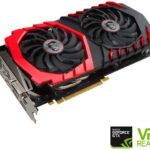
Obviously, these builds center around the GTX 1060, NVIDIA’s new graphics card aimed at a general audience. The 1060 is a huge jump over last generation’s GTX 960, and it will run most modern games on maximum settings at 1440p resolution and 60 frames per second. That means it will hit even higher frame rates at 1080p resolution.
As stated before, we advise waiting for aftermarket options to hit the market, if you can wait that long. Not only will the price likely be lower, but aftermarket cards often come with improved cooling solutions and manufacturer overclocks to improve performance further.
CPU: Intel Core i5-7500

This quad core processor from Intel is a solid upper mid-range processor. With a stock clock speed of 3.4Ghz and ability to boost up to 3.8GHz when the extra processing speed is needed, it is a strong gaming chip when paired with an appropriate card.
CPU Cooler: Cryorig M9i
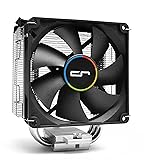
Compact and quiet, the Cryorig M9i will keep your CPU cooler and quieter than the stock heatsink would. Can be a bit tricky to install, so read the instructions carefully.
Motherboard: MSI Z270-A Pro
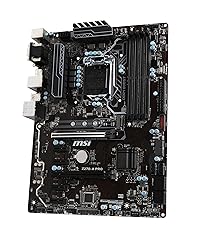
This motherboard offers all the features you need and doesn’t offer any you don’t. With USB-C, SLI and M.2 covered, it is a quality Z270 board for a very nice price.
RAM: 16GB DDR4-3000
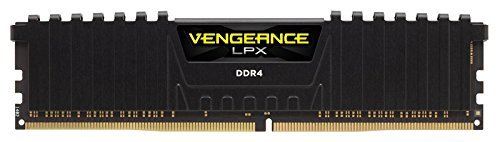
A fast and affordable 16GB kit. 3000 is currently the best value speed.
SSD: Crucial MX300 275GB
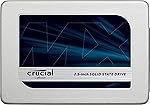
A fair sized SSD that will make your boot and load times pleasantly short.
HDD: 2TB HGST
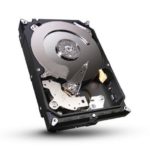
Reliable storage for all your games and media. If you need more space, do not hesitate to buy a larger drive instead, or to buy another when you need it in the future.
PSU: 650W EVGA GQ

A high-quality, quiet, gold-rated modular power supply. More than is needed for the GTX 1060, but offers solid reliability and plenty of upgrade potential for the future.
Case: Phanteks P400s (Silent Edition)

A new case from Phanteks, this is the silent version and features sound dampening materials as well as a built in fan controller. Easy to create an aesthetically tidy build and with enough storage locations for the average user case scenario, it has optional accessories if those would possibly be exceeded.
The Small Form Factor 1060 Build
This build fits into a nice small mini ITX form factor, but provides just as much performance. The SSD is actually a little faster. It also comes with built-in WiFi.
GPU: GTX 1060
CPU: Intel i5-7500
Cooler: Stock Intel cooler
Motherboard: ASRock Z270M-ITX/ac
RAM: 8GB DDR4-2400
SSD: 240GB PNY CS2211
HDD: 2TB HGST
PSU: 500W Rosewill Valens 80+ Gold Modular
Case: Fractal Design Define Nano S
—
Video: Building a PC with the GTX 1060
—
For either build, you’re likely to want to get a couple more things:
- A copy of Windows. You may be able to get a free or inexpensive copy through your office or school. If not, we recommend Windows 10 on DVD ($90) or USB Flash Drive ($120).
- An optical drive, especially if you buy Windows on DVD. This is a good cheap DVD-RW ($21). Or, this blu-ray + DVD burner ($60).
We also have recommendations for:
If you want to see other builds that do the best they can with less expensive components, or higher performance builds, check out the main page at Logical Increments.
If you have any questions or suggestions, let us know in the comments.
53 Comments
You can post comments in this post.
Is there any chance that the mobo in SFF build could have any alternatives? There seems to be almost no information about the “MSI H100i Pro AC” except the amazon link provided in the article.
Mere Sjom 10 years ago
Hey Mere, I just corrected a slight typo in the article — that’s supposed to be the H110i, not H100i. Sorry about that.
Either way, you are welcome to substitute any LGA 1151 mini ITX motherboard. There are a lot to choose from.
James 10 years ago
I’m looking at a similar build to the first one mentioned in the post, except I’m going with an i5-6600K for overclocking. Is 650W an appropriate PSU size?
Alex Loiben 10 years ago
The 650W would still work, though if you plan to overclock a lot bumping it up to a 750W or something similar couldn’t hurt.
Matthew Zehner 10 years ago
Can you update The Smooth silky build for world of Warcraft legion?since build have already been deployed it would really help. Also would love to see a budget pc for Smooth playing it in 1080p
SHJordan 10 years ago
We haven’t really updated any information about World of Warcraft in a while but we will consider doing so!
Matthew Zehner 10 years ago
Please do.recommended required setup for it is already out and latest patch is the pre legion one (7.0)
SHJordan 10 years ago
I will definitely bring up doing so!
Matthew Zehner 10 years ago
Cant wait!?
SHJordan 10 years ago
Can you also do a recommended build guide for Final Fantasy 14 Online, I want to how much I have to spend for to get 60FPS Max Settings on 1080p 144HZ monitor. Thanks!
Michael 10 years ago
We will definitely consider doing so, though it would likely be lower on our priority list because we try to cater to new, extremely popular games. I’d be happy to offer personal help if you want, though!
Matthew Zehner 10 years ago
What tier would you suggest I should look into to play max settings 60fps on 1080p 144hz monitor?
Michael 10 years ago
A 144HZ monitor can support up to 144FPS, so if you are only looking for 60 I would recommend spending less and getting a 60Hz monitor.
Matthew Zehner 10 years ago
Thanks, will do.
Michael 10 years ago
No problem!
Matthew Zehner 10 years ago
How does the ASRock H110m compare to the MSI H110i? The ASRock mobo is about 20% cheaper than the MSI mobo, but there’s little information on either boards.
Alan Tweetie 10 years ago
In my looking at the specifications, they actually appear to be very similar in most every way.
Matthew Zehner 10 years ago
Would you need a Z mobo if you’re using a 6500? Surely it’s not needed since you aren’t overclocking.
Lazy 10 years ago
Well you can boost non-k CPUs, but regardless Z motherboards are simply great quality at the price, even if you aren’t overclocking.
Matthew Zehner 10 years ago
Can you recomend any slightly cheaper motherboards for the $1000 pc build?
nick salt 10 years ago
Here are some good options:
http://www.newegg.com/Product/Product.aspx?Item=N82E16813128863&nm_mc=AFC-C8Junction&cm_mmc=AFC-C8Junction-LogicalIncrements.com%20Inc-_-na-_-na-_-na&cm_sp=&AID=10440897&PID=5961731&SID=0
http://www.newegg.com/Product/Product.aspx?Item=N82E16813157636&nm_mc=AFC-C8Junction&cm_mmc=AFC-C8Junction-LogicalIncrements.com%20Inc-_-na-_-na-_-na&cm_sp=&AID=10440897&PID=5961731&SID=0
http://www.newegg.com/Product/Product.aspx?Item=N82E16813130890&nm_mc=AFC-C8Junction&cm_mmc=AFC-C8Junction-LogicalIncrements.com%20Inc-_-na-_-na-_-na&cm_sp=&AID=10440897&PID=5961731&SID=0
Matthew Zehner 10 years ago
Thanks <3
nick salt 10 years ago
Glad to help!
Matthew Zehner 10 years ago
Sir Matthew, i think you should change the RAM on the SFF build because that Motherboard can only handle 2133 mhz so 2400 would be useless (it will still work but only 2133) and well i tried to buy the 2133 at amazon and they gave me a 2400 instead but i don’t wanna waste time sending it back so ill just use it anyway. And umm, i used the Asrock h110M-ITX/AC for the mobo and upped the CPU to i5-6500. Well the PSU is still 500M. Here is my complete build.
CPU: i5-6500
GPU: GTX 6500
Motherboard: AsRock h110m-itx/ac
RAM: 16GB 2400 gskills ripjaws.V (Amazon’s fault, not me)
HDD: 1tb seagate
SDD: Samsung 850 240GB
PSU: 500M rosewill valens
Case: Fractal design nano s
I don’t know how to cable manage tho XD
Josiah Cheleo Borja 10 years ago
Yes, as you said the 2400 will still work but just won’t reach it’s maximum speed. We will consider updating it, but it works as is. If you want to do gaming, you should definitely upgrade your GPU, but for everyday use it looks good!
Matthew Zehner 10 years ago
Holy crap. At first I was like, wtf? Why would I upgrade my gpu Then I saw it was 6500 lol. Typo it was supposed to be 1060
HAHAHAHA.
Anyways I can’t edit, I forgot my old Disqus acc.
Josiah Cheleo Borja 10 years ago
Ah, gotcha. Yeah the 1060 is very different from a 6500 haha. Looks like a good build!
Matthew Zehner 10 years ago
Hi, Do you think the i5 6500 would be enough to handle the 1060? is there any bottleneck if i pair the i5 6500 with the 1060? thx
Christian Nguyen 10 years ago
Yes, it should be enough!
Matthew Zehner 10 years ago
I’m looking to build a PC with these new wave of cards. Also looking to cost effectively upgrade over time. Disappointing you can’t have 2 GTX1060’s within the same system. Where would you rate 2 RX480’s on your tier list, as you can have 2 of those in the same system, correct?
Chaz 10 years ago
I wouldn’t really reccomend having 2 RX480s. Crossfire can cause a lot of issues and doesn’t work in all games. At that budget I would reccomend just getting a 1070.
The two 480s are generally slightly better than a 1070 (http://arstechnica.com/gadgets/2016/07/amd-rx-480-crossfire-vs-nvidia-gtx-1080-ashes/ ). They would likely fall right around the “Outstanding/Exceptional” tiers. They do get close to the 1080 in instances, but not too often.
Matthew Zehner 10 years ago
That’s disappointing. The budget isn’t to have 2 RX480’s day 1. Superb build that I could upgrade, not outstanding that I could upgrade. Greatly appreciate your responses though, I will research this “Crossfire” you speak of. Thanks!
Chaz 10 years ago
Glad to help! Crossfire is just the term for running 2 AMD cards at once.
Matthew Zehner 10 years ago
Will the i3 6100 affect the performance of gtx 1060 at 1080p? I mean to say bottleneck. Please help me.
Manash Ghosh 10 years ago
It will likely cause a slight bottleneck, yes.
Matthew Zehner 10 years ago
Will it be at playable fps at 1080p? Have you tested it?
Manash Ghosh 10 years ago
I have not personally tested this system, no. Most all games should still be playable at 1080p, though I would be happy to give specific numbers for certain games if you would like.
Matthew Zehner 10 years ago
Yeah, why not. I am having a pc with i3 6100 and 8gb ram. That’s why I am asking you what will be the performance of gtx 1060 pairing with i3 6100. I dont want to run at 4k or 1440p. I want to play at 1080p at max out. What about 750ti or above for i3 6100
Manash Ghosh 10 years ago
I will use the Deus Ex: Mankind Divided since it is extremely demanding and relevant.
On ultra at 1080P the 1060 will average about 35 FPS. As we can see here: http://www.techspot.com/review/1235-deus-ex-mankind-divided-benchmarks/page5.html the i3 6100 can easily keep up. This should be the case in most games – there being no bottleneck – however a slight one may appear in CPU demanding games. Regardless, the 6100 should work perfectly well.
I would definitely reccomend the 1060 over 750Ti – it is significantly more powerful.
Matthew Zehner 10 years ago
Could I use this build but swap the 1060 for a 1070
Jacob 10 years ago
Sure! There would be no compatibility issues.
Matthew Zehner 10 years ago
Guys just wondering, is B85M-GAMER motherboard compatible for this video card?
Edwin Ramirez 10 years ago
It is, yes!
Matthew Zehner 10 years ago
oh ty very much!
Edwin Ramirez 10 years ago
No problem!
Matthew Zehner 10 years ago
Hi, would this build work well with a 1070?
Kleyber 10 years ago
It sure would! You may get slight CPU bottlenecks, but only in certain CPU-intensive games.
Matthew Zehner 10 years ago
Is the Palit a trusty brand?
Manash Ghosh 10 years ago
Would the GTX 1060 work with an I5 4690k?
With another motherboard of course
ziyad abashna 10 years ago
Definitely! There aren’t really any compatibility issues with GPUs and CPUs.
Matthew Zehner 10 years ago
Thanks
ziyad abashna 10 years ago
Glad to help!
Matthew Zehner 10 years ago
Would the GTX 1060 work with an I5 4690k?
With another motherboard of course
ziyad abashna 10 years ago
Post A Reply