Daniel Podgorski' Post

Best Free Programs to Install on a New PC

Here at Logical Increments, we receive numerous questions and comments from people who are either about to build a computer, are actively building a computer, or have just built a computer. (Shocking, I know!)

One question that has been common among all three groups is, ‘What programs do you recommend putting on a new computer directly after installing the operating system?’ Well, I can’t speak for the needs of every user (nor even for the preferences of every LI team member), but I can offer you a list of excellent programs that I personally install on just about every computer for my own use after building a PC.

All of them are free or have worthwhile free versions, and many of them are volunteer-produced and/or open-source software. These programs encompass an array of important categories, including workstation tasks, media playback, and hardware monitoring/security—and will be (loosely) grouped along those lines below.

Let’s take a look!

Read More


Building a Budget Mini ITX PC

Mini ITX PCs are famous among builders for being deceptively difficult and expensive to create. The unassuming, small stature of such builds may make them look like smaller projects than mid towers or full towers to newcomers—but the tight spaces in the cases, the higher temperatures of such close quarters, and the specialty parts they sometimes require can balloon the challenge and the cost.

In this article, we take a look at putting together a tiny build for a modest price: building a capable Mini ITX small form factor computer for about $390, similar in price and performance to a larger low-end PC.

Read More


5 Aesthetic PC Mods That Don’t Involve LEDs

The Gemsbok PC with electric blue carbon fiber wrap - 5 Aesthetic Mods for your PC that DON’T Involve LEDs - no LEDs

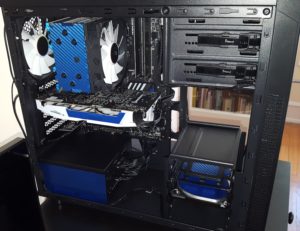
My black-and-white build with blue carbon fiber wrap, without its side panels

I am not an opponent of LEDs… in moderation. My own PC case has a strip of white NZXT LEDs running all the way around the edges of the inside, just to provide a nice, cool, even illumination. But it is simply beyond doubt that LEDs are one of the most common and most divisive aesthetic accents in the PC hardware world, and their ubiquity is only increasing as manufacturers are shoving them into everything.

Whether you’re looking for ideas for how to give your build some visual flair without the glow, or just hoping to meaningfully supplement your LED array’s existing look, seek no further.

This list has five straightforward ideas for how to alter your case or components in alternative, good-looking ways. And this article won’t be relying on wild gimmicks like custom wood cases or builds submerged entirely in mineral oil.

So, no LEDs. Here we go:

Read More


Four Practical Alternative Uses for Empty 5.25” Drive Bays

Icy Dock Expresscage - 4 practical alternative uses for 5.25" drive bays

Icy Dock’s Expresscage Tool-less Hot-swappable 2.5″ Drive Enclosure

While there are a great number of options these days for good-looking PC cases that entirely lack 5.25” drive bays, the majority of cases still offer at least one of these spaces. And efficient builders won’t want that space being used for nothing.

Don’t get me wrong: Many builders still do want to use those spaces to house intended utilities, including disc drives, card readers, extra USB ports, and even floppy drives. But that doesn’t mean there won’t still be an unoccupied bay sitting around at the end of the day. (I personally have a Pioneer Blu-Ray/DVD/CD player in my tower, and for the time being, it sits above an unused 5.25” bay.)

So, here are a few ideas for what to do with those bays instead of leaving them as cavities in your build:

Read More


Types of VRAM Explained: HBM vs. GDDR5 vs. GDDR5X

SEC VRAM - Different Kinds of VRAM Explained—HBM vs. GDDR5 vs. GDDR5X

Some Samsung VRAM

All graphics cards need both a GPU and VRAM to function properly. While the GPU (Graphics Processing Unit) does the actual processing of data to output images on your monitor, the data it is processing and providing is stored and accessed from the chips of VRAM (Video Random Access Memory) surrounding it.

Outputting high-resolution graphics at a quick rate requires both a beefy GPU and a large quantity of high-bandwidth VRAM working in tandem. For most of the past decade, VRAM design was fairly stagnant, and focused on using more power to achieve greater VRAM clock speeds.

Read More